
Is Microsoft Copilot the best AI for my business?
Microsoft M365 Copilot
Every Feature. Explained Simply.
A complete guide to what Microsoft 365 Copilot can do, how to pick the right feature for the job, and one real example for each.
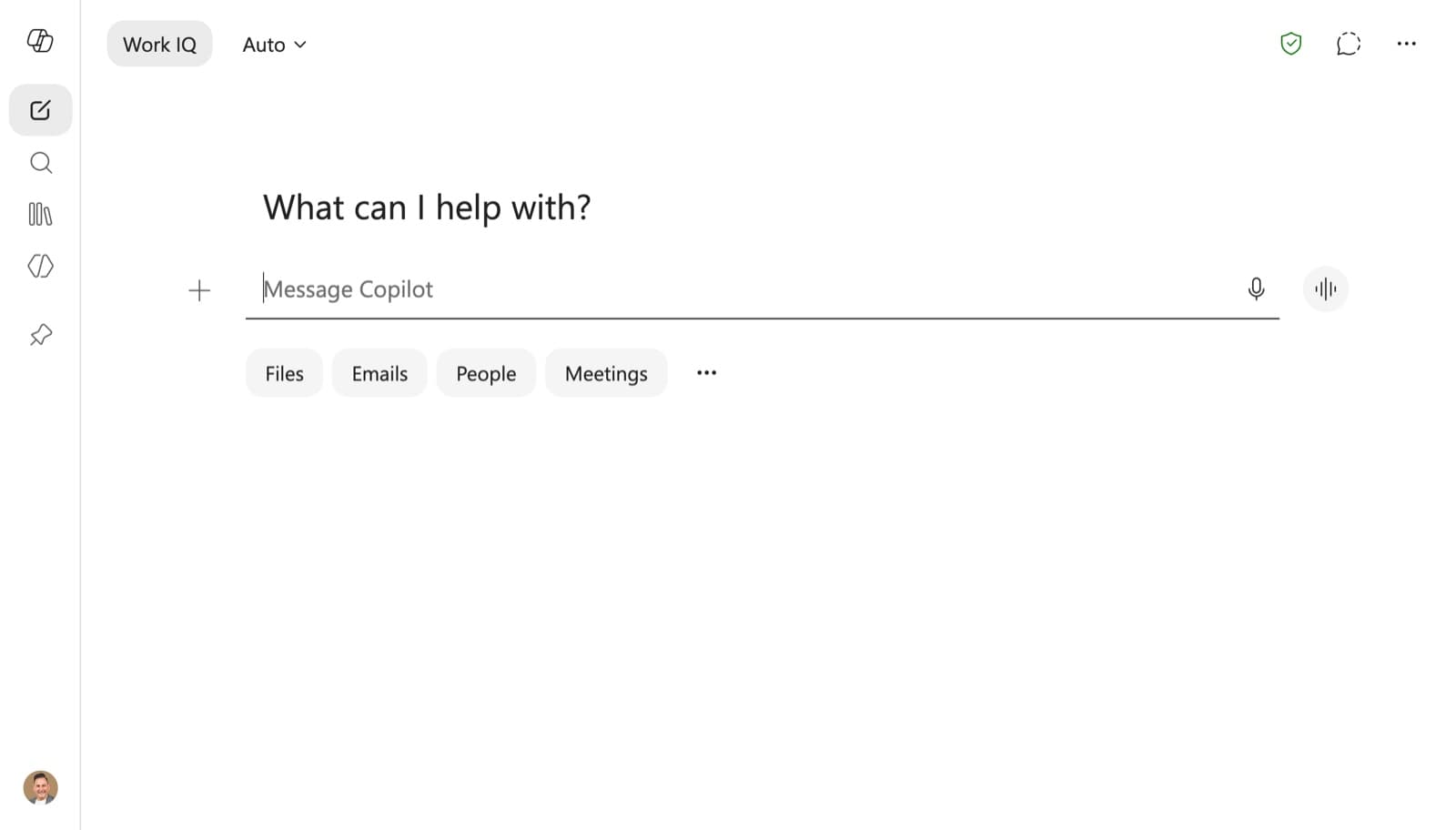
Copilot's major app redesign shipped on 28 May 2026. The chat interface is now cleaner, loads 50% faster, and is more task aware. The prompt box expands into a full task-aware workspace and surfaces relevant tools as you work. Work IQ is now a single toggle in the top left, combining org data and web grounding into one switch. There is a new expandable left navigation with pinned agents, apps, Notebooks, and conversations, plus a new Tasks tab. Since the rollout, Copilot use is up 27% in Word, 33% in Excel, 43% in PowerPoint, and 30% in Outlook.
How to pick the right feature
The key to M365 Copilot: it lives where your work already happens. You do not open a separate app. Copilot appears inside Word, Excel, Outlook, Teams, and the Copilot app. So the question is never "should I open Copilot?" It is "which surface do I need it in?" Work IQ is the layer that connects everything. It reads your emails, files, meetings, and chats so Copilot has full org context before you even type.
Open Copilot Chat in the M365 Copilot app, Teams, or microsoft365.com. The Work IQ toggle grounds responses in your org data automatically. Use the Researcher agent for deeper, cited research.
Use Copilot in Word. It now has full agentic capabilities, generally available since April 2026. It plans, drafts, restructures, and refines the whole document, not just one paragraph at a time.
Use Copilot in Excel. With Work IQ it pulls context from your emails and meetings without you referencing them. Ask in plain English and it builds formulas, charts, and PivotTables.
Use Copilot in Outlook to summarise threads, draft replies, set up auto replies, and manage your calendar. It reasons across your whole inbox and calendar, not just the open email.
Use Copilot in PowerPoint. Describe the presentation you need and it generates a complete draft with slides, content, and speaker notes. Agentic mode now creates and formats end to end.
Use Copilot in Teams. It transcribes, summarises, and pulls action items from any meeting. You can ask it questions about what was discussed, even after the meeting ends.
Use Copilot Notebooks, a persistent project workspace. It gathers files, emails, chats, meeting notes, Pages, and web links, with Copilot reasoning across all of it in one view.
Build a Copilot Agent in Copilot Studio. Configure it with instructions, data sources, and actions. No code needed. Agents can respond to users, take autonomous actions, and run on a schedule.
Use the Researcher agent. It reasons across your org data and the public web at the same time, then delivers a structured, cited report. It takes minutes, up to about 45 for the deepest work. Pick a reasoning mode: Auto (picks the right approach), Critique (GPT responses refined by Claude), or Model Council (GPT and Claude reason deeply together).
Use Copilot Cowork, on the Frontier programme. It handles long running, multi step tasks that execute over time across your M365 data and connected tools, without you babysitting each step.
The M365 Copilot difference: you do not leave your app to use AI. Copilot meets you where the work is, in Word, Excel, Outlook, Teams, or the Copilot app. Work IQ connects everything in the background so Copilot always has your org context, not just the document in front of you.
Foundations, understand these first
These are the core concepts that make M365 Copilot work. Understand them and every other feature makes sense. They also explain why Copilot gets better the more your org uses it.
Work IQ
Copilot licenceThe intelligence layer that knows your work, your people, and your organisation
Work IQ is the intelligence layer behind M365 Copilot. It maps your emails, files, meetings, chats, and relationships into a live work graph. When you ask anything, it has already surfaced the relevant context from across your org before you attach a source. The May 2026 redesign made it a single toggle in the top left of chat, combining org data grounding and web grounding into one control. When it is on, which is the default, Copilot reasons across your org data and the public web at once. This is what makes Copilot different from a generic AI tool. The model knows your org, not just general knowledge.
Model Choice
Copilot licenceGPT-5.5, Claude Opus 4.7, pick the right AI for the job
M365 Copilot runs on GPT-5.5 with two modes in Copilot Chat via the model selector. As of May 2026 you get Quick Response for fast everyday tasks, Think Deeper for deep reasoning with a visible thought process, and Claude Opus 4.7 for complex multi step tasks, document analysis, and advanced instruction following, through Microsoft's partnership with Anthropic. With Work IQ on, all models are grounded in your org data. Claude in Copilot is available in Excel and PowerPoint now, with Word coming in summer 2026. The model matters for complex tasks. For everyday prompting, the default Quick Response mode is the right starting point.
Memory
Copilot licenceCopilot learns your preferences and working style over time
Memory lets Copilot remember key facts about you, your preferences, working style, recurring projects, and how you like responses structured, so you do not repeat yourself each session. You can also set explicit Custom Instructions like "always use bullet points" or "keep emails under 100 words". Memory is managed in Settings and is admin controlled at the tenant level. Voice chats can reference memory too, so Copilot carries your preferences into spoken conversations. It works alongside Work IQ. Memory is what Copilot knows about you as a person. Work IQ is what it knows about your work graph.
Copilot Chat and research
The Copilot app and Copilot Chat are your AI home base. This is the place for open ended questions, research, and work that spans multiple apps and data sources.
Copilot Chat
All M365 usersThe main AI workspace, available everywhere in M365
Copilot Chat is the primary conversation interface. It lives in the M365 Copilot app, on microsoft365.com, inside Teams across chats, channels, and meetings, and on mobile. The May 2026 redesign made it cleaner and faster, with a task aware prompt workspace that expands for deep work, simpler navigation, a new Tasks tab, and the consolidated Work IQ toggle. Basic Copilot Chat without a Copilot licence gives web grounded responses with enterprise data protection. A Copilot licence adds full Work IQ grounding across your org data, model choice, agents, and Notebooks.
Researcher Agent
Copilot licenceDeep multi-source research, org data plus web, cited and structured
Researcher is a built in first party agent in Copilot Chat, found under the Agents section. It does complex, multi step research by reasoning across your M365 data and the public web at once, then delivers a structured, cited report. It takes minutes, up to about 45 for the deepest work. You can choose from three reasoning modes: Auto picks the right approach for you, Critique has GPT responses refined by Claude, and Model Council has GPT and Claude reason deeply together. It uses multiple models including Claude through Anthropic's partnership with Microsoft. It is a core part of the experience. Users cannot remove or disable it individually, though admins can block it at tenant level.
Analyst Agent
Copilot licenceAdvanced data reasoning, from raw data to forecasts and visuals
Analyst is Researcher's data focused counterpart, built for going from raw data to interpretation, forecasts, and charts. Where Researcher synthesises knowledge, Analyst reasons through structured data and can run Python code with verifiable steps, showing its working at each stage. It interprets datasets, spots anomalies, builds visual summaries, and produces forecasts, all within the M365 security boundary. Use Researcher to understand context and background. Use Analyst to interrogate the numbers.
Copilot Notebooks
Copilot licencePersistent project workspace, files, chats, Pages, and web in one view
Copilot Notebooks are persistent, AI grounded project workspaces. They gather all your relevant content, uploaded files, SharePoint sites, OneNote notebooks, Copilot Pages, chat history, and now external web links, so Copilot can reason across everything in one place. The 2026 redesign brought a three column side by side view of references, Pages, and chat. You can create and edit Copilot Pages through the Notebook chat, generate mind maps of key themes, and produce Word documents, PowerPoint decks, or audio recaps directly from Notebook content. Notebooks can be shared with M365 Groups and grounded on an agent's knowledge base.
Copilot Pages
Copilot licenceShared AI canvas, bring Copilot outputs into a collaborative live document
Copilot Pages are collaborative live documents that you and Copilot build together. When Copilot generates a response, you turn it into a Page with one click, then invite colleagues to view, edit, and add to it in real time. Pages live inside Notebooks and the M365 Copilot app, and can now include interactive visuals, apps, and dashboards generated by Copilot with Work IQ grounding. They bridge the gap between a Copilot conversation and a shared document a team can work on together.
Copilot inside your apps
This is M365 Copilot's biggest differentiator. It lives inside the tools your org already uses. Agentic capabilities in Word, Excel, and PowerPoint went generally available in April 2026, a shift from assistance to autonomous action inside each app. Before 2026, Copilot inside apps was mostly reactive, responding to single prompts in the current document. Now it can plan and execute multi step work across a whole document, workbook, or presentation on its own, drawing on Work IQ context and iterating until the job is done. This is not "suggest the next sentence." It is "build me this document from scratch, end to end."
Copilot in Word
Copilot licenceDraft, rewrite, restructure, and now act end-to-end on a whole document
Copilot in Word has always handled drafting, rewriting, summarising, and tone shifting. With the April 2026 agentic upgrade it now plans and executes multi step work across the entire document on its own. It can create a full document from a brief, restructure an existing report, or build a contract from a template. Citations now display automatically whenever Copilot draws from web content or Work IQ sources. A Legal Agent for Word is on the roadmap, built for contract review, redlining, and negotiation using structured legal workflows.
Copilot in Excel
Copilot licenceAnalyse data, build formulas, and make multi-step edits in plain English
Copilot in Excel, now called "Edit with Copilot", uses agentic capabilities to build and change workbooks, including tables, charts, PivotTables, and formulas, to complete complex data tasks. Work IQ brings in the most relevant context from emails, meetings, and files without you referencing them. It now works on locally stored Excel files, not just cloud files, which matters for finance and operations teams handling sensitive data. Ask in plain English and Copilot handles the mechanics.
Copilot in PowerPoint
Copilot licenceBuild complete presentations from a brief or existing content
Copilot in PowerPoint generates complete decks from a brief, reformats and redesigns existing slides, adds speaker notes, and now creates visual infographics from technical notes or documentation, rolling out worldwide in June 2026. It can also convert a Researcher report, Copilot Page, or Notebook directly into a PowerPoint deck with one action. The agentic upgrade means it works end to end on the full deck, not just the current slide. Copilot use in PowerPoint is up 43% since the new experience rolled out.
Copilot in Outlook
Copilot licenceManage your inbox, draft emails, and handle your calendar
Copilot in Outlook reasons across your whole inbox, calendar, and meeting history, not just the currently open email. It drafts replies in your writing style, summarises long threads with citations to the specific emails it used, sets up auto replies using natural language, and helps manage calendar scheduling. The 2026 update added implicit grounding, so you can reference emails and threads directly in your prompt without attaching them. Agentic capabilities arrive in Outlook later in 2026, extending autonomous action into email and calendar management.
Copilot in Teams
Copilot licenceMeeting intelligence, real-time assistance, and chat catchup
Copilot in Teams transcribes, summarises, and pulls action items from every meeting, during it or after it ends. You can ask questions about what was discussed even after you leave, and Copilot references the transcript. In 2026, Copilot Chat is accessible directly inside Teams chats, channels, and meetings, not just as a separate sidebar. Meeting summaries can become Copilot Pages, go to Notebooks, or turn into Word documents or PowerPoint decks with one action. Audio recap generates a spoken summary you can listen to later.
Agents, your configurable AI workforce
Agents are where M365 Copilot becomes an organisational capability rather than a personal productivity tool. They answer questions, take autonomous actions, run on schedules, and operate across your whole M365 stack. Copilot Chat responds to your prompts. Agents are delegates. You configure them once and they act on your behalf, proactively or on a schedule, without you starting each interaction. Think of Copilot Chat as asking a smart colleague a question. Think of an agent as hiring a specialist who knows exactly what to do and gets on with it.
Copilot Agents
Copilot licenceCustom AI assistants built for a specific role or workflow
Copilot Agents are custom AI assistants configured with specific instructions, knowledge sources, and the ability to take actions, built in Copilot Studio without code. They respond to users in Teams or the Copilot app, access connected data sources, and act on triggers or schedules. Agents are discovered and deployed through the Agent Store in the M365 Copilot app, and managed by IT via Microsoft Agent 365, which went generally available in May 2026. Organisations can build their own, buy from partners, or use Microsoft's first party agents like Researcher and Analyst.
Copilot Studio
Copilot licenceBuild, test, and deploy agents, no code required
Copilot Studio is the no code, low code platform for building Copilot Agents. You define the agent's persona, knowledge sources, actions, triggers, and output format. Agents built here can be grounded on Work IQ, connected to third party data via connectors, and configured with autonomous actions. Computer using agents, generally available since May 2026, can interact with apps and websites directly, just as a human would. Deep reasoning lets agents run complex, multi step business processes.
Copilot Cowork
FrontierLong-running, multi-step work that unfolds over time
Copilot Cowork is Microsoft's answer to agentic AI for knowledge work, built for tasks that take minutes or hours across multiple steps and tools, not just a single prompt and response. It is available via the Frontier programme, early access for qualifying organisations. Cowork uses Work IQ for full org context and can execute, adjust its approach, and follow through across everyday M365 workflows. It expanded in May 2026 with reusable skills, broader integrations, and mobile device support. This is the most advanced agentic capability in M365, comparable to Claude's Cowork or ChatGPT's Workspace Agents.
Organisation and knowledge layer
M365 Copilot's distinctive strength over standalone AI tools is its deep integration with your org's data and knowledge infrastructure.
Prompt Gallery
Copilot licenceReady-to-use prompts curated for business tasks
The Prompt Gallery, new in May 2026, helps users move from "what can Copilot do?" to actually trying it. It surfaces ready to use prompts organised by task, like drafting content, preparing for meetings, analysing information, and catching up on work. Organisations can add their own custom prompts and share them across the team. It is the lowest friction entry point for new users, removing the blank page problem that holds most people back in the first weeks.
Organisational Data (Microsoft Graph)
Copilot licenceCopilot only sees what you can already see, permissions respected
M365 Copilot accesses your org's data through Microsoft Graph, the same permissions layer that governs SharePoint, Teams, Outlook, OneDrive, and other M365 services. Copilot can only surface content a user already has permission to see. It does not create new access pathways or expose restricted content. This is both the safety guarantee and the reason data hygiene matters. If content is not in the right place with the right permissions, Copilot cannot use it. Your data is never used to train Microsoft's AI models.
Voice + Apple CarPlay
Copilot licenceTalk to Copilot hands-free, even from your car
Copilot now supports voice conversations in the M365 app, including the ability to reference your Memory so it knows your preferences without you re briefing it out loud. As of May 2026, Copilot is also available in Apple CarPlay, a hands free way to use it from your car's display and audio. Review priorities, catch up on the day, or capture ideas without typing. This extends M365 Copilot beyond the desk for the first time.
Feature quick-reference by planShow tableHide
| Feature | Free Copilot Chat | Microsoft 365 Copilot ($30/user/mo, $18 SMB promo) | Frontier Programme |
|---|---|---|---|
| Copilot Chat (web grounding) | Yes | Yes | Yes |
| Work IQ (org data grounding) | No | Yes | Yes |
| Model choice (GPT-5.5 / Claude) | No | Yes | Yes |
| Memory + Custom Instructions | No | Yes | Yes |
| Copilot in Word (agentic) | Basic only | Yes, full | Yes, full |
| Copilot in Excel (agentic) | Basic only | Yes, full | Yes, full |
| Copilot in PowerPoint (agentic) | Basic only | Yes, full | Yes, full |
| Copilot in Outlook | Basic only | Yes, full | Yes, full |
| Copilot in Teams (meeting intelligence) | No | Yes | Yes |
| Copilot Notebooks | No | Yes | Yes |
| Copilot Pages | No | Yes | Yes |
| Researcher + Analyst Agents | No | Yes | Yes |
| Prompt Gallery | No | Yes | Yes |
| Copilot Agents (custom, via Copilot Studio) | No | Yes, plus Agent 365 | Yes |
| Voice + CarPlay | No | Yes | Yes |
| No training on org data | Yes | Yes | Yes |
| Copilot Cowork (long-running agentic) | No | No | Yes, Frontier |
The one thing that makes M365 Copilot different
M365 Copilot's core advantage is not the AI model. It is the data context. ChatGPT and Claude are powerful, but they start every conversation knowing nothing about your org. M365 Copilot starts every conversation already knowing your emails, files, meetings, and relationships through Work IQ. For businesses already deep in the Microsoft ecosystem, that context advantage compounds every time Copilot is used. The trade off is that you are operating inside Microsoft's infrastructure, so AI quality depends partly on how well your org's data is structured, governed, and permissioned. Garbage in, garbage out. But organised M365 data in, remarkable productivity out. On pricing, there are two tiers. Free Copilot Chat comes with eligible Microsoft 365 and gives web grounded responses with enterprise data protection. The paid add-on is Microsoft 365 Copilot ($30/user/mo, $18 SMB promo), which unlocks Work IQ org grounding, model choice, agents, Notebooks, and full agentic Copilot inside your apps.

Want your team fluent in Copilot?
Justin Kabbani runs hands-on training that turns Copilot from a curiosity into daily capability across your organisation.